
Roslyn Heights Server Workstation Repair
What is a Work Station?
A workstation can be any computer. Usually the Workstation title refers to computers which the standard user utilizes. Workstations also mean that if your computer network is setup properly, either most of your data, if not all of your data should be located on a centralized server. If this was to happened to the workstation, you should not have to worry about anything on that workstation. Standard computer users should not have access to the server, for way too many reasons. Macs can also take the name workstation as they also have servers. Since all workstations take the brunt all most user abuses. These devices will eventually fail. Every user will get a warning sign that something is not right. One example is that the Computer Hard Drive is failing. Having a failing Hard Drive is like having a pot hole in a road, on which your car may drive upon. If that pothole is not fixed, that pothole will continue to get bigger. Same with a failing Hard Drive, if you don’t get your data transferred over to a replacement drive, more damage to your data will occur.
A failing Hard Drive is not the only problem a workstation can have. There are many other problems that can cause your Workstation to not work correctly. Most of the time, I have noticed user’s workstations to have very bad performance, but that user just continues to use the workstation until it fails completely. Usually when this happens, the costs are much higher in getting the workstations fixed. Networks by Design has specialist and troubleshooters that has the ability to fix most Workstations and Servers problems.
Long Island Server Workstation Repair & Installation
The configuration of servers can be quite complicated. Most users, or even advance users who have a general understanding of computers can still struggle to configure a server correctly.
What You Should Know About Server Setup
- DNS (Domain Name Server)
- Domain Controller (Active Directory)
- Exchange Server (Email Server)
- Website Server (IIS-Internet Information Services)
- FTP Server
- File Server
- Application Server
- Terminal Services
- WINS Server
- DHCP Server
- Media Streaming Server
What Is A Server?
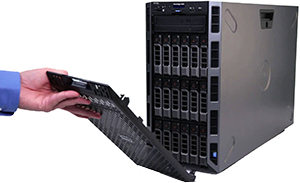
What Is Considered “Server Equipment”?
Server equipment is designed to be left powered on all day long. Manufacturers design server equipment with; multiple processors, redundant power supplies(if one of the power supplies fails, the other one keeps the system running), a centralized data backup system, and also redundant hard drives(if one of the hard drives fails, the system continues to run in a slow state).
What Are Some Advantages Of Having A Server?
- Most businesses want to have permission over which of their employees have access to company files.
- Having a server makes backing up your data easier!
- Having the ability to have multiple users access data simultaneously, by taking a load off of your processor in a workstation.
- Some software companies require a server in order that their software functions.
- The ability to maximize performance with multiple hard drives, if set up correctly to slow down the loss of data.
What Are Some Disadvantages Of Having A Server?
- Downtime – If the server fails to function correctly, workstations may not work at optimum speed until reconfigured.
- Monitoring – Servers need to be monitored from time to time, to ensure optimum performance.
- Backups – It is highly recommended that backups are occurring.
- Liability – Hackers can potentially target one server versus multiple computers.
- Cost – Prices have been found to be significantly higher than computers.
What Is A NAS?
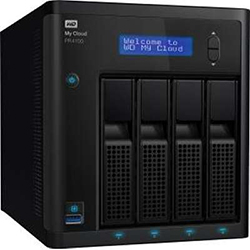
A network attached storage device (NAS). This device is built to host your files so that multiple computers can access them without a server. Some of our customers go this route because a server computer is not cost effective for their business.
WHY NETWORKS FOR YOUR SERVER WORKSTATION REPAIR & INSTALLATION?
At Networks, we observe the “kiss method”. We keep it simple so that our work is not confusing to the customer. Most customers don’t need half of what’s installed on their server. So, if you’re having any issue regarding Server Repair & Installation, Networks has the certified technicians you need to resolve the issue in the best and most cost effective way possible!
Residential & Commercial – We Come to You!
Roslyn Heights Benefits of Professional Server & Workstation Repair
When you choose Networks for your Long Island IT needs, you get:
- Fast Diagnosis — We identify the root cause quickly — hardware, software, or network.
- Data Protection First — We back up your data before making any repairs, period.
- All Brands & OS — Windows, Mac, Linux servers — we service them all.
- Same-Day Service — Service agreement customers get priority same-day response.
- Preventive Maintenance — Regular checkups catch failing drives and overheating before crashes.
- RAID Recovery — Failed RAID array? We rebuild and recover your data.
- Server Migration — Upgrade or migrate servers with minimal downtime.
- 24/7 Monitoring — Drive health, temperature, and critical event monitoring through service agreements.
Roslyn Heights Frequently Asked Questions
What server and workstation repair services do you offer on Long Island?
We repair all types of servers and workstations — hardware diagnostics, drive replacement, RAID rebuilds, memory upgrades, OS reinstalls, data recovery, cooling system repair, power supply replacement, and full system restoration. We service all brands and operating systems.
How quickly can you respond to a server emergency?
Service agreement customers receive priority same-day or next-day response. For server emergencies, call (516) 889-0777 and we’ll deploy a technician as fast as possible. Server downtime costs your business money.
Do you work on both Windows and Mac servers?
Yes. Our technicians are certified on Windows Server, Mac OS Server, and Linux servers. We also service workstations running Windows, macOS, and Linux. We handle mixed-environment networks common on Long Island.
Can you recover data from a failed server?
Yes. We perform data recovery from failed hard drives, SSDs, RAID arrays, and corrupted file systems. We always back up data before attempting repairs. For severe cases, we partner with clean-room data recovery specialists.
How much does server repair cost on Long Island?
The cost depends on the problem, parts needed, and labor time. We provide a free diagnostic and quote before any work begins. Service agreement customers receive discounted rates. Call (516) 889-0777 for a free assessment.
Do you offer ongoing server maintenance?
Yes. Our service agreements include regular server maintenance — drive health checks, backup verification, security updates, performance optimization, and 24/7 monitoring. Preventive maintenance catches problems before they cause downtime.
Can you help us upgrade or migrate our server?
Absolutely. We handle server upgrades, migrations, and virtualization projects. We plan the migration to minimize downtime, preserve all data, and test everything before going live.
What areas of Long Island do you service for server repair?
We service all of Long Island — Nassau County, Suffolk County, and Queens. Our technicians are located throughout the area for fast response times.
Roslyn Heights Ready to Get Started?
Server problems don’t wait — and neither do we. Our Long Island server repair team is ready to diagnose and fix the issue fast.
Call (516) 889-0777 or contact us online for a free diagnostic.
Networks — Professional IT Services
51 Alabama Ave, Island Park, NY 11558
Residential & Commercial - We Come to You!
